The Codest
  • Apie mus
  • Paslaugos
    • Programinės įrangos kūrimas
      • Priekinės dalies kūrimas
      • Galinės dalies kūrimas
    • Staff Augmentation
      • Priekinės dalies kūrėjai
      • Atgalinės versijos kūrėjai
      • Duomenų inžinieriai
      • Debesų inžinieriai
      • QA inžinieriai
      • Kita
    • Patariamoji tarnyba
      • Auditas ir konsultacijos
  • Pramonės šakos
    • Fintech ir bankininkystė
    • E-commerce
    • Adtech
    • Sveikatos technologijos
    • Gamyba
    • Logistika
    • Automobiliai
    • IOT
  • Vertė už
    • CEO
    • CTO
    • Pristatymo vadybininkas
  • Mūsų komanda
  • Case Studies
  • Sužinokite, kaip
    • Tinklaraštis
    • Susitikimai
    • Interneto seminarai
    • Ištekliai
Karjera Susisiekite su mumis
  • Apie mus
  • Paslaugos
    • Programinės įrangos kūrimas
      • Priekinės dalies kūrimas
      • Galinės dalies kūrimas
    • Staff Augmentation
      • Priekinės dalies kūrėjai
      • Atgalinės versijos kūrėjai
      • Duomenų inžinieriai
      • Debesų inžinieriai
      • QA inžinieriai
      • Kita
    • Patariamoji tarnyba
      • Auditas ir konsultacijos
  • Vertė už
    • CEO
    • CTO
    • Pristatymo vadybininkas
  • Mūsų komanda
  • Case Studies
  • Sužinokite, kaip
    • Tinklaraštis
    • Susitikimai
    • Interneto seminarai
    • Ištekliai
Karjera Susisiekite su mumis
Atgal rodyklė GRĮŽTI ATGAL
2022-10-04
Programinės įrangos kūrimas

3 Useful HTML Tags You Might Not Know Even Existed

The Codest

Jacek Ludzik

Product Designer

Nowadays, accessibility (A11y) is crucial on all stages of building custom software products. Starting from the UX/UI design part, it trespasses into advanced levels of building features in code. It provides tons of benefits for developers that work on increasing DX, but more importantly for end users. One of those a11y parts in HTML are semantic tags and that’s what I’d like to cover here.

Front-end developers have to be closely familiar with HTML tags since this is their natural environment on a daily basis. I bet all of you know some basic tags such as <header>, <section>, <footer> and so on. But, for example, did you know that you can suggest a word-break moment using just HTML, without CSS?

WBR

Let’s assume you’re working on some website or app for a German client. As you know, German words can be reeeaally long. So you have the design with some text content you have to reproduce in kodas and this content has to break in very specific moments. Here comes the <wbr> tag to help you.

Geburtstagskuchen

That’s it! With such a simple tag, you can manipulate text contents as you wish.

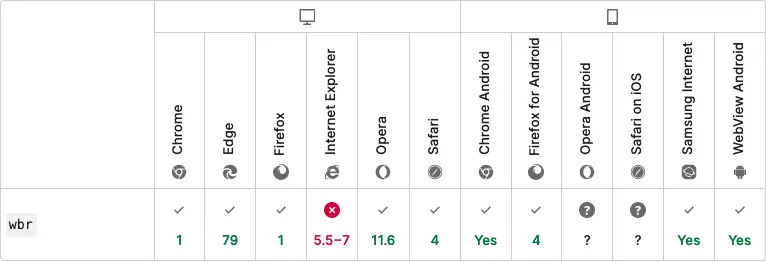
But what about browser support? Well, it’s pretty good, to be honest. Most browsers will understand this tag, but Opera on Android and Safari on iOS might have problems.

wbr compability table

METER

Imagine you’re building a disk storage manager app. You need to somehow show in UI how much storage is still available, and you really want to make it as accessible as possible. This is just a perfect use-case for the <meter> tag. It’ll just you only the value within a defined range. Another cool thing about this tag are its attributes:

  • low → when the current value is lower than the set low value, the meter’s bar will become red;
  • optimum → when the current values is higher than optimum attribute value, the meter’s bar will become green;
  • high → when high value is lower than maximum and higher than optimum value, the meter’s bar will be orange. Otherwise, it’ll be green.

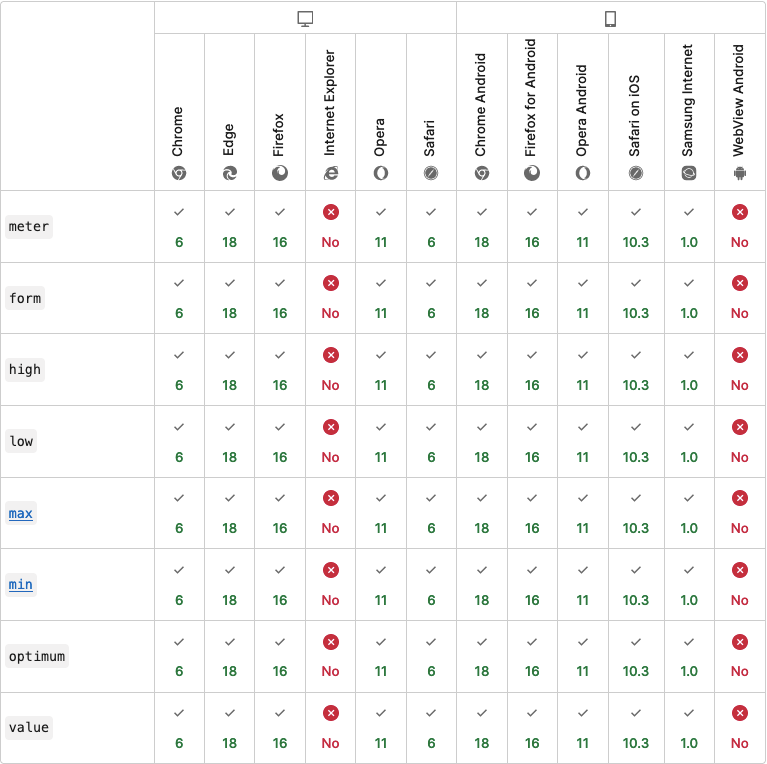
You might also know a similar tag, which is progress. So, what’s actually the difference between them? The progress tag should be used for ongoing tasks. In other words, use the progress tag when you deal with a specific task. With the meter tag, it should be used to show disk or memory usage. Another difference is that the meter tag isn’t supported by IE and that it is actually the only disadvantage of this tag.

meter compability meter

DEL and INS

Have you ever wondered how to build an accessible indicator of deleted and added parts of content (diff in GitHub or email notifications from Jira when the ticket has been updated)? You just need to wrap the deleted content with the<del>tag. For example: <del><p>Just deleted content</p></del>. To show just the added part of the content, you can use the<ins> tag in exactly the same way. This tag offers also two attributes:

  • cite → uri of a resource that explains why this part has been added;
  • datetime → duomenys and time of the change.
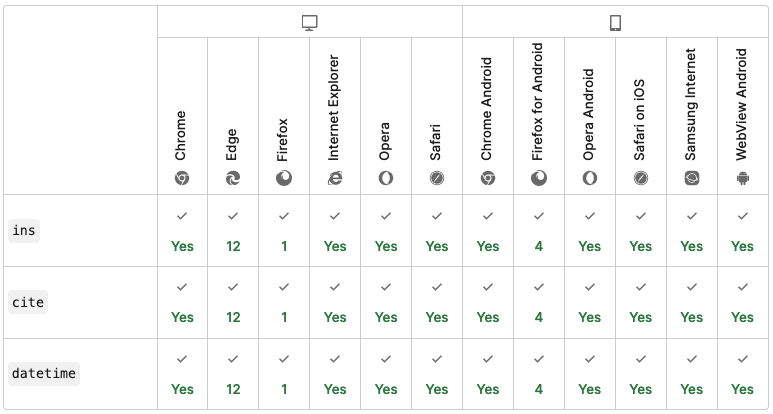
ins compability table

There are, of course, much more useful tags in HTML . I highly recommend using all of them when it’s possible and appropriate. Your clients and app users will thank you for such an approach. Be careful though, because some tags might be deprecated. You can always make sure that a less common tag you want to use is still valid and has good support in MDN documentation.

Susiję straipsniai

Programinės įrangos kūrimas

Sužinokite daugiau apie Ruby on Rails su "Pub/Sub

"Pub/Sub" projektui gali duoti daug naudos - dėl jos kodas gali būti švarus, paslaugos gali būti atskirtos ir lengvai keičiamos. Daugiau apie "Pub/Sub" sužinosite šiame straipsnyje...

The Codest
Michal Pawlak Vyresnysis "Ruby" programuotojas
Programinės įrangos kūrimas

Veiksmingi Javascript įrankiai

Atraskite keletą JavaScript paieškos įrankių, kurie padės patobulinti jūsų programavimo žaidimą. Sužinokite daugiau apie ESLint, Prettier ir Husky!

The Codest
Reda Salmi React kūrėjas
Programinės įrangos kūrimas

Vidaus ir išorės programuotojų samdymas

Ar samdote darbuotojus iš vidaus, ar iš išorės? Tai didžiausia dilema! Sužinokite outsourcing ar vidinės komandos kūrimo privalumus šiame straipsnyje.

The Codest
Grzegorz Rozmus "Java" padalinio vadovas
Programinės įrangos kūrimas

9 klaidos, kurių reikia vengti programuojant "Java" kalba

Kokių klaidų reikėtų vengti programuojant "Java" kalba? Šiame straipsnyje atsakysime į šį klausimą.

The Codest
Rafal Sawicki "Java" programuotojas

Prenumeruokite mūsų žinių bazę ir būkite nuolat informuoti apie IT sektoriaus patirtį.

    Apie mus

    The Codest - tarptautinė programinės įrangos kūrimo bendrovė, turinti technologijų centrus Lenkijoje.

    Jungtinė Karalystė - būstinė

    • 303B biuras, 182-184 High Street North E6 2JA
      Londonas, Anglija

    Lenkija - vietiniai technologijų centrai

    • Fabryczna biurų parkas, Aleja
      Pokoju 18, 31-564 Krokuva
    • Brain Embassy, Konstruktorska
      11, 02-673 Varšuva, Lenkija

      The Codest

    • Pagrindinis
    • Apie mus
    • Paslaugos
    • Case Studies
    • Sužinokite, kaip
    • Karjera
    • Žodynas

      Paslaugos

    • Patariamoji tarnyba
    • Programinės įrangos kūrimas
    • Galinės dalies kūrimas
    • Priekinės dalies kūrimas
    • Staff Augmentation
    • Atgalinės versijos kūrėjai
    • Debesų inžinieriai
    • Duomenų inžinieriai
    • Kita
    • QA inžinieriai

      Ištekliai

    • Faktai ir mitai apie bendradarbiavimą su išoriniu programinės įrangos kūrimo partneriu
    • Iš JAV į Europą: Kodėl Amerikos startuoliai nusprendžia persikelti į Europą?
    • Technikos plėtros centrų užsienyje palyginimas: Tech Offshore Europa (Lenkija), ASEAN (Filipinai), Eurazija (Turkija)
    • Kokie yra svarbiausi CTO ir CIO iššūkiai?
    • The Codest
    • The Codest
    • The Codest
    • Privacy policy
    • Website terms of use

    Autorinės teisės © 2026 The Codest. Visos teisės saugomos.

    lt_LTLithuanian
    en_USEnglish de_DEGerman sv_SESwedish da_DKDanish nb_NONorwegian fiFinnish fr_FRFrench pl_PLPolish arArabic it_ITItalian es_ESSpanish nl_NLDutch etEstonian elGreek pt_PTPortuguese cs_CZCzech lvLatvian lt_LTLithuanian