The Codest
  • Par mums
  • Pakalpojumi
    • Programmatūras izstrāde
      • Frontend izveide
      • Backend izstrāde
    • Staff Augmentation
      • Frontend izstrādātāji
      • Backend izstrādātāji
      • Datu inženieri
      • Mākoņa inženieri
      • QA inženieri
      • Citi
    • Tā Konsultatīvais dienests
      • Audits un konsultācijas
  • Nozares
    • Fintech un banku darbība
    • E-commerce
    • Adtech
    • Healthtech
    • Ražošana
    • Loģistika
    • Automobiļu nozare
    • IOT
  • Vērtība par
    • CEO
    • CTO
    • Piegādes vadītājs
  • Mūsu komanda
  • Case Studies
  • Zināt, kā
    • Blogs
    • Tikšanās
    • Tiešsaistes semināri
    • Resursi
Karjera Sazinieties ar mums
  • Par mums
  • Pakalpojumi
    • Programmatūras izstrāde
      • Frontend izveide
      • Backend izstrāde
    • Staff Augmentation
      • Frontend izstrādātāji
      • Backend izstrādātāji
      • Datu inženieri
      • Mākoņa inženieri
      • QA inženieri
      • Citi
    • Tā Konsultatīvais dienests
      • Audits un konsultācijas
  • Vērtība par
    • CEO
    • CTO
    • Piegādes vadītājs
  • Mūsu komanda
  • Case Studies
  • Zināt, kā
    • Blogs
    • Tikšanās
    • Tiešsaistes semināri
    • Resursi
Karjera Sazinieties ar mums
Atpakaļ bultiņa ATGRIEZTIES ATPAKAĻ
2022-10-04
Programmatūras izstrāde

3 Useful HTML Tags You Might Not Know Even Existed

The Codest

Jacek Ludzik

Product Designer

Nowadays, accessibility (A11y) is crucial on all stages of building custom software products. Starting from the UX/UI design part, it trespasses into advanced levels of building features in code. It provides tons of benefits for developers that work on increasing DX, but more importantly for end users. One of those a11y parts in HTML are semantic tags and that’s what I’d like to cover here.

Front-end developers have to be closely familiar with HTML tags since this is their natural environment on a daily basis. I bet all of you know some basic tags such as <header>, <section>, <footer> and so on. But, for example, did you know that you can suggest a word-break moment using just HTML, without CSS?

WBR

Let’s assume you’re working on some website or app for a German client. As you know, German words can be reeeaally long. So you have the design with some text content you have to reproduce in kods and this content has to break in very specific moments. Here comes the <wbr> tag to help you.

Geburtstagskuchen

That’s it! With such a simple tag, you can manipulate text contents as you wish.

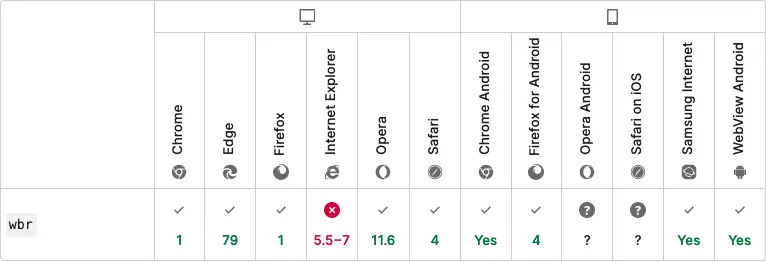
But what about browser support? Well, it’s pretty good, to be honest. Most browsers will understand this tag, but Opera on Android and Safari on iOS might have problems.

wbr compability table

METER

Imagine you’re building a disk storage manager app. You need to somehow show in UI how much storage is still available, and you really want to make it as accessible as possible. This is just a perfect use-case for the <meter> tag. It’ll just you only the value within a defined range. Another cool thing about this tag are its attributes:

  • low → when the current value is lower than the set low value, the meter’s bar will become red;
  • optimum → when the current values is higher than optimum attribute value, the meter’s bar will become green;
  • high → when high value is lower than maximum and higher than optimum value, the meter’s bar will be orange. Otherwise, it’ll be green.

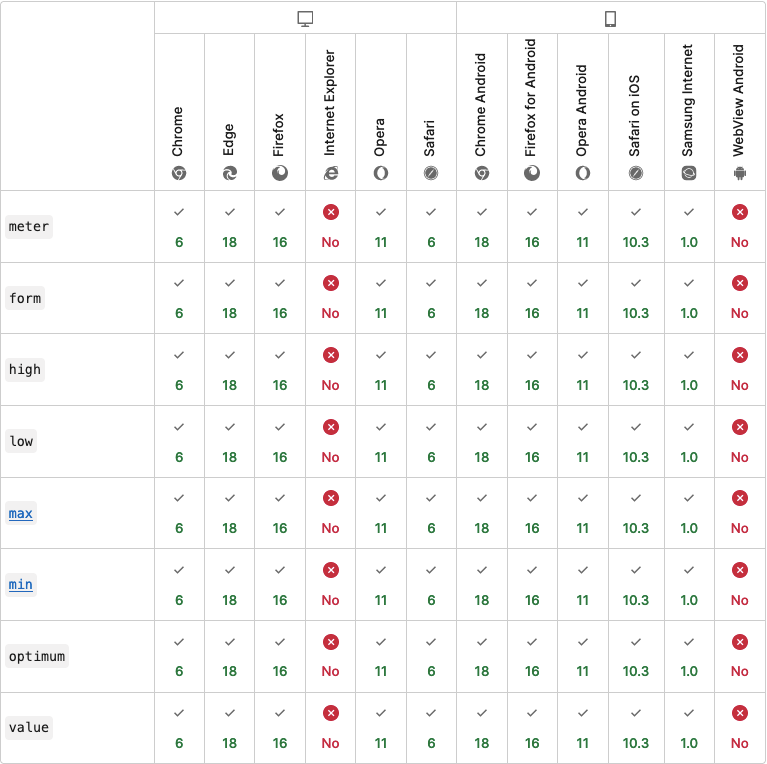
You might also know a similar tag, which is progress. So, what’s actually the difference between them? The progress tag should be used for ongoing tasks. In other words, use the progress tag when you deal with a specific task. With the meter tag, it should be used to show disk or memory usage. Another difference is that the meter tag isn’t supported by IE and that it is actually the only disadvantage of this tag.

meter compability meter

DEL and INS

Have you ever wondered how to build an accessible indicator of deleted and added parts of content (diff in GitHub or email notifications from Jira when the ticket has been updated)? You just need to wrap the deleted content with the<del>tag. For example: <del><p>Just deleted content</p></del>. To show just the added part of the content, you can use the<ins> tag in exactly the same way. This tag offers also two attributes:

  • cite → uri of a resource that explains why this part has been added;
  • datetime → dati and time of the change.
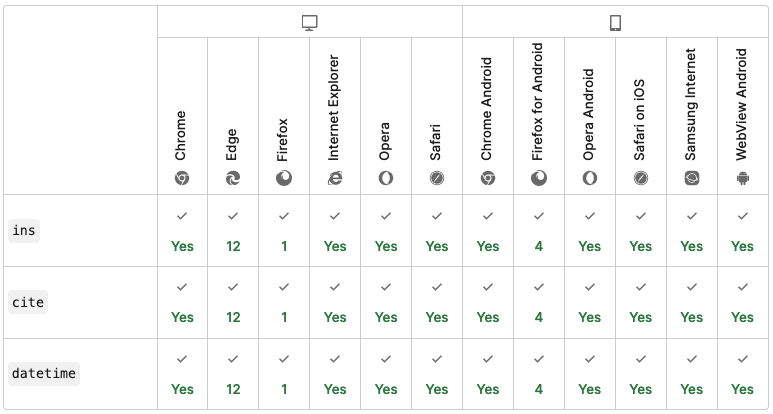
ins compability table

There are, of course, much more useful tags in HTML . I highly recommend using all of them when it’s possible and appropriate. Your clients and app users will thank you for such an approach. Be careful though, because some tags might be deprecated. You can always make sure that a less common tag you want to use is still valid and has good support in MDN documentation.

Saistītie raksti

Programmatūras izstrāde

Uzzināt vairāk par Ruby on Rails ar Pub/Sub

Pub/Sub var sniegt projektam daudz priekšrocību - tas var padarīt kodu tīru, atsaistīt pakalpojumus un padarīt tos viegli mērogojamus. Uzziniet vairāk par Pub/Sub šajā rakstā...

The Codest
Michal Pawlak Vecākais Ruby programmētājs
Programmatūras izstrāde

Javascript rīki darbībā

Atklājiet dažus JavaScript izgūšanas rīkus, lai uzlabotu savu programmēšanas spēli. Uzziniet vairāk par ESLint, Prettier un Husky!

The Codest
Reda Salmi React Izstrādātājs
Programmatūras izstrāde

Iekšējo un ārējo izstrādātāju pieņemšana darbā

Darbinieku pieņemšana darbā iekšēji vai ārēji? Tā ir vislielākā dilemma! Šajā rakstā uzziniet outsourcing vai iekšējās komandas veidošanas priekšrocības.

The Codest
Grzegorz Rozmus Java vienības vadītājs
Programmatūras izstrāde

9 kļūdas, no kurām jāizvairās, programmējot Java valodā

No kādām kļūdām vajadzētu izvairīties, programmējot Java valodā? Šajā rakstā mēs atbildēsim uz šo jautājumu.

The Codest
Rafal Sawicki Java izstrādātājs

Abonējiet mūsu zināšanu bāzi un saņemiet jaunāko informāciju par IT nozares pieredzi.

    Par mums

    The Codest - starptautisks programmatūras izstrādes uzņēmums ar tehnoloģiju centriem Polijā.

    Apvienotā Karaliste - Galvenā mītne

    • 303B birojs, 182-184 High Street North E6 2JA
      Londona, Anglija

    Polija - Vietējie tehnoloģiju centri

    • Fabryczna Office Park, Aleja
      Pokoju 18, 31-564 Krakova
    • Brain Embassy, Konstruktorska
      11, 02-673 Varšava, Polija

      The Codest

    • Sākums
    • Par mums
    • Pakalpojumi
    • Case Studies
    • Zināt, kā
    • Karjera
    • Vārdnīca

      Pakalpojumi

    • Tā Konsultatīvais dienests
    • Programmatūras izstrāde
    • Backend izstrāde
    • Frontend izveide
    • Staff Augmentation
    • Backend izstrādātāji
    • Mākoņa inženieri
    • Datu inženieri
    • Citi
    • QA inženieri

      Resursi

    • Fakti un mīti par sadarbību ar ārējo programmatūras izstrādes partneri
    • No ASV uz Eiropu: Kāpēc Amerikas jaunuzņēmumi nolemj pārcelties uz Eiropu?
    • Tehnoloģiju ārzonas attīstības centru salīdzinājums: Tech Offshore Eiropa (Polija), ASEAN (Filipīnas), Eirāzija (Turcija)
    • Kādi ir galvenie CTO un CIO izaicinājumi?
    • The Codest
    • The Codest
    • The Codest
    • Privacy policy
    • Website terms of use

    Autortiesības © 2026 The Codest. Visas tiesības aizsargātas.

    lvLatvian
    en_USEnglish de_DEGerman sv_SESwedish da_DKDanish nb_NONorwegian fiFinnish fr_FRFrench pl_PLPolish arArabic it_ITItalian es_ESSpanish nl_NLDutch etEstonian elGreek pt_PTPortuguese cs_CZCzech lt_LTLithuanian lvLatvian